The Best Offline Budget Apps — And the Three-Question Test Most of Them Fail
An offline budget app should work with no account, no bank sync and no internet. Here's how to test that in five minutes, and which apps actually pass.

If you want a budget app that genuinely works without an internet connection, without linking a bank, and without an account on someone's server, the shortlist is Portofelo (ours), Money Manager, Bluecoins, Monefy and Actual Budget. Everything else in this category advertises "offline mode" and means something much weaker.
The distinction matters more than it sounds, because "offline" has quietly come to mean four different things. Below is a five-minute test you can run yourself before trusting an app with a year of your spending history. If you are still weighing offline against a bank feed at all, our guide to choosing a budgeting app takes that trade-off head on.
What "offline" actually means
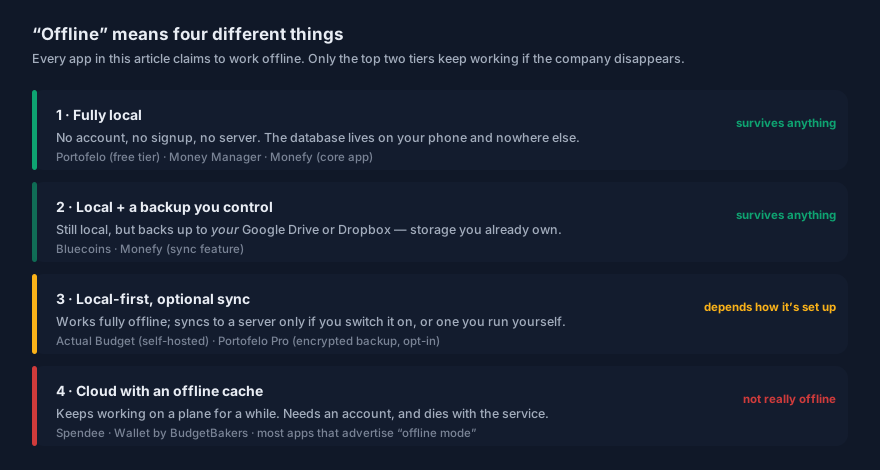
Most apps in this space sit in tier 4 and use the word anyway. They cache your data so the app doesn't break on a plane, but there's an account, a server, and a copy of your finances on infrastructure you don't control. That's a perfectly reasonable product. It just isn't offline in the sense people mean when they search for it.
The tiers that matter are the first two, because they share one property: your data survives the company. If the developer is acquired, pivots, or shuts down, tier 1 and 2 apps keep working, because nothing was ever on their end.
That's not hypothetical. Mint had around 20 million users and Intuit closed it in 2024. Small finance apps disappear constantly and much more quietly.
The three-question test
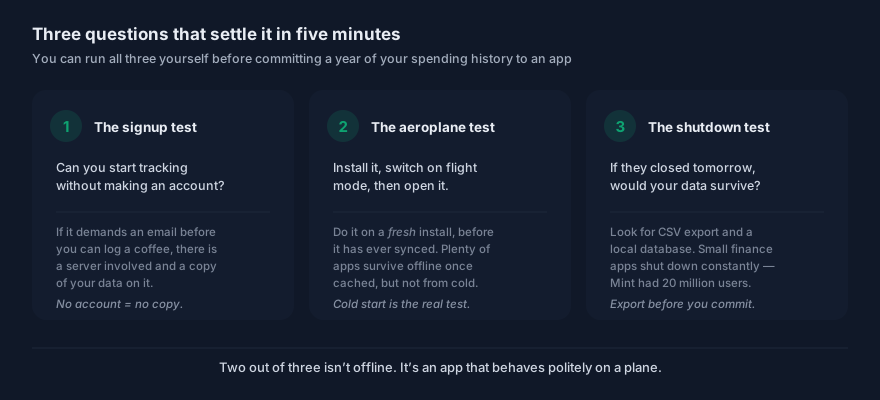
Can you start without an account?
Install the app and try to log an expense. If it demands an email address before you can record a €3 coffee, there is a server involved and a copy of your data will live on it. No account means no copy — it's the cleanest single signal in this whole category.
Does it work in flight mode from a cold start?
This is the one people get wrong. Plenty of apps work offline after they've synced once, because the data is cached. Install the app, switch on flight mode immediately, and open it. If it shows a spinner or an error, it's a cloud app with a cache.
Would your data survive the company closing?
Look for two things: CSV export, and confirmation that the database is local. If both exist, you can walk away with your history intact whenever you like. Export once during your first week — not because you expect a shutdown, but because the export working is the proof.
An app needs all three. Two out of three isn't offline; it's an app that behaves politely on a plane.
Why people want this
The obvious reason is privacy, but in practice there are four, and only one is about paranoia.
Bank connections in Europe are genuinely annoying. PSD2 requires re-authorisation every 180 days — it was 90 until Regulation (EU) 2022/2360 doubled it in July 2023 — coverage of smaller banks is patchy, and connections break silently. A lot of people arrive at manual tracking after a sync-based app stopped syncing. Manual entry works better than people expect. Typing a purchase makes you notice it. Automatic sync is convenient precisely because it's invisible, which is also its weakness — plenty of people with perfectly synced apps still have no idea where their money goes, because nothing ever made them look. Travel. Roaming, patchy hotel wifi, and foreign SIMs are exactly when you most want to track spending and least want an app that needs a server. Longevity. A local database you can export is a financial record you'll still have in ten years. A cloud account is a record you have until someone else decides otherwise.The apps
| App | Price | Platforms | Tier | Bank sync | Receipt scanning |
|---|---|---|---|---|---|
| Portofelo | Free; Pro €2.99/mo | iOS | 1 (Pro adds opt-in sync) | No, by design | Yes, line-item |
| Money Manager | Free; one-time Premium | iOS, Android | 1 | No | No |
| Monefy | Free core; paid upgrade | iOS, Android | 1–2 | No | No |
| Bluecoins | Free; $15.99 once on iOS | iOS, Android | 2 | No | No |
| Actual Budget | Free self-hosted; $7.95/mo cloud | Web, iOS, Android | 3 | Optional (GoCardless) | No |
Portofelo
Ours, and it's first here because it's the only app in this list that sits in tier 1 and doesn't make you give something up for it.
No bank connection, nothing to authorise, no account required to start. The database lives on your phone, so it works with no internet at all and keeps working regardless of what happens to us. iPhone only for now — there is no Android build yet, and that is the honest strike against it in this list. If iPhone is what you carry, the best budgeting apps for iPhone covers the Apple-specific detail: widgets, iCloud, locking and App Store ratings.
The free tier has no caps of any kind — unlimited budgets, unlimited accounts, unlimited transactions, no ads, plus 50 AI receipt scans a month. That's a more generous free tier than anything else here: Money Manager's free version carries ads, Monefy's caps accounts, and Actual Budget's "free" means running your own server. Pro is €2.99/month for encrypted cloud backup and sync, CSV export, unlimited scans and priority support — and turning sync on is the one thing that moves you from tier 1 to tier 3, entirely at your choice.
Then there's the part that doesn't exist anywhere else in this category. Point the camera at a receipt and it reads the individual line items, not just the total, and categorises them automatically. That's what turns "groceries, €480" into which €90 of it was actually snacks. Every other offline app here records the transaction; this one records the shopping — on a device with no bank connection at all.
Where it won't fit: there are no shared or couple budgets yet, so if you're tracking money jointly, Spendee does that better today. And if you want pivot-style analytical reporting, Bluecoins is more mature.
Pick Portofelo if you want tier-1 privacy without paying for it in ads, dated interfaces or server admin — and you'd rather know what you actually bought than just what you spent. It's here.Money Manager (Realbyte)
The most-installed app in this list by a wide margin — over 50 million downloads — and the strongest free option if you want maximum depth and don't mind ads.
It stores everything locally, needs no internet, and has proper double-entry accounting underneath, which means the numbers reconcile properly rather than approximately. Premium is a one-time purchase for lifetime use, confirmed by Realbyte's own help centre, not a subscription.
What annoyed me: the interface is dense and dated, and the sheer number of features gets in the way of the basic act of logging something quickly. The free version also carries ads.
Pick Money Manager if you want maximum capability for no money and you don't mind an app that looks like accounting software, because functionally it is.Bluecoins
The best of these if reporting is what you care about. Deep, genuinely powerful reports, budgets that handle rollover sensibly, and multi-currency that works properly.
Its backup model is the honest version of cloud: it writes to your Google Drive or Dropbox rather than to the developer's servers. You own the storage, so you keep the data regardless of what happens to the app.
What annoyed me: the learning curve is real, and it's the least attractive app here. Android pricing shifts around with promotions.
Pick Bluecoins if you want serious analytical depth and you never want another subscription — $15.99 once on iOS is the best value in this article.Monefy
Still the fastest expense entry I've used. Open, tap a category on the circle, type the amount, done. Two seconds. That is a real feature, and it's why people stay with it for years.
The core app is free and works offline; syncing goes through your own Drive or Dropbox.
What annoyed me: depth. Budgets are basic and reporting is thin. Its pricing is also unusually opaque — Monefy's website publishes no price at all, and the App Store listing currently shows a "Monefy Premium" in-app purchase at $59.99, which is a long way from the cheap one-time unlock most reviews still quote. Check the listing yourself before buying; it holds a 4.7-star average from over 6,600 ratings, so plenty of people are happy, but going in without knowing the price is not ideal.
Pick Monefy if logging speed matters more to you than anything else. If you want more depth, I've compared the alternatives in detail.Actual Budget
The technical pick, and genuinely excellent if it fits you. Open source, local-first, and built by former YNAB users to reproduce zero-based envelope budgeting as software you own.
Self-hosting is free. Their managed cloud is $7.95/month if you'd rather not run a server, though that moves you into tier 3.
What annoyed me: "free" here means free like a puppy is free. Docker, a server, updates, backups. If that isn't your idea of a good weekend, budget for the hosted version.
Pick Actual Budget if you want the zero-based method permanently and you're comfortable running a container. I've covered where it fits among the cheaper YNAB alternatives.Frequently asked questions
What is the best offline budget app?
For most people, Money Manager — it's free, fully local, and enormously capable. For analytical depth without a subscription, Bluecoins at a one-time $15.99. For the fastest possible logging, Monefy. For zero-based budgeting you host yourself, Actual Budget. For an uncapped free tier with per-item receipt scanning, ours.
They're all genuinely offline, which is the hard part. Choosing between them is mostly about how much complexity you want.
Is there a budget app that doesn't need a bank connection?
Yes, and there are more of them than the big roundups suggest. Money Manager, Bluecoins, Monefy and Portofelo never touch your bank — you add transactions manually or by scanning receipts. Actual Budget supports optional bank syncing via GoCardless but works entirely without it.
Skipping the bank connection means no credentials shared, no PSD2 re-authorisation every 180 days, and no broken syncs to debug.
Do offline budget apps still work if the company shuts down?
Tier 1 and tier 2 apps do, because your data was never on the company's servers. The app keeps running on your phone and your history stays intact — though it will stop receiving updates and may eventually break with a future OS release.
Export to CSV periodically as insurance. That's the difference between an app closing being an inconvenience and being a data loss.
Is manual expense tracking better than automatic bank sync?
For behaviour change, often yes. Entering a purchase forces you to register it, which is precisely the friction that automatic sync removes. Many people with flawlessly synced apps still can't say where their money went, because they never had to look.
Automatic sync wins on completeness — it won't forget a transaction the way you will. The honest trade is accuracy versus awareness, and which matters more depends on whether your problem is record-keeping or spending.
Can an offline app still back up my data?
Yes, and the good ones separate the two ideas. Bluecoins and Monefy back up to your own Google Drive or Dropbox, so the storage is yours rather than the developer's. Portofelo Pro offers encrypted cloud backup as an opt-in extra rather than a requirement.
The distinction worth holding onto: an app that can back up to the cloud is different from one that has to. The first is a feature; the second is a dependency.
The verdict
If you take one thing from this, take the three questions. Run them on any app claiming to be offline and you'll sort the category in five minutes flat — most fail on the cold-start test, and a surprising number fail on the very first one.
Portofelo is where I'd start: tier 1, the only genuinely uncapped free tier here, both platforms, and per-item receipt scanning nothing else in this category offers. Money Manager is the strongest alternative if you want maximum depth for nothing and can live with ads. Bluecoins is the best value for analytical reporting without a subscription. Monefy wins on raw logging speed. Actual Budget is the right answer for zero-based budgeting you host yourself.Whichever you land on, export your data once in the first week. Not because you expect the app to disappear — but because the export working is what makes the choice reversible.
Four companion pieces, each going deeper than this overview can:
- Budget apps that never ask for your bank login — why PSD2 makes European bank sync break every six months, and what going manual actually costs you.
- Tracking expenses abroad with no signal — cash, three currencies, and receipts in a language you do not read.
- Portofelo vs Monefy — speed against depth, with Monefy winning the rounds it wins.
- Portofelo vs Money Manager — the closest fight here, and the one where our app loses most of it.
I build Portofelo, an offline-first expense tracker for iPhone. I've spent more hours than I'd like to admit inside other people's budgeting apps, and I write about what actually works.
All articles by Elena Marek →Related articles
Start tracking your finances today
Portofelo makes budgeting and expense tracking effortless. Free to download.
Get Portofelo Free